List of Directories for Promoting a Blog
Blog Directories:
5starblogsA1Weblinks reciprocal or $$$
Addyourblog
Allafrica
All-Blogs.net fee or reciprocal
Answers
Autosmoto
Aviva fee
Biggerblogger
Birminghambloggers
Blawg
Blawgrepublic
Blloggs
Blogarama
Blogaz
Blogburst
Blogbib fee or reciprocal
BlogCatalog
Blogcode
Blog-collector
Blogs-collection
Blogdir
Blogdir.com
Blog-directory
Blogfolders
Bloggapedia
Bloggerhq
Bloggerschoiceawards
Blogexplosion
Blogfinds
Blogflux
Blogged
Bloggapedia
Bloggernity
Bloghints
Bloghop
Bloghub
Blogion
Blogintro
Bloglines
Bloglisting
Blogmob
Bloggernow
Blogotion
Blogrankings
Blogs.com
Blogsbywomen
Blogscanada
Blogscholar
Blogsearch
Blog-search
Blogsearchengine
Blogsrating
Blogtree
Blogs-collection
Blogscholar
Blogville
Blogz
Blogz
Blurt It
Britblog
Browseblogs
Chefsblogs
Christiansunite
BoingBoing
BOTW Blog Directory fee
Bulletize fee
ContentsMatter
Crayon
Dfwblogs
Directorybest
Diarist
Dmoz
EatonWeb
Ezilon
Eponym
Feedboy
Feeddirectory
Feedmap
Feednuts
Flookie
FindingBlog
FyberSearch
Geekyspeaky $$$$ or reciprocal
Genwi
Getblogs
Globeofblogs
Gnoos
Gobignetwork
Gozoof
Grokodile
IBlog Business Directory fee
Jewishblogging
Kmax
Leftyblogs
LSBlogs
Mkeonline
Mozdex
Mvblogs
Myblog2u
Myblogdirectory
Nitle blog census
Nycbloggers
Orblogs
Outpost-earth
Poddop
Quickblogdirectory
Rateitall
SmallBusiness.com New
Spicypage
Sports
Sportsblogs
Somethingjewish
Strategicboard
Submitblognow
Superblogdirectory
The lefty directory
Theblogresource
Theseoking
Portal.eatonweb fee
Regator
Scienceport
Small Business Blog Dir fee
SmallBusiness.com
TheVital
TruthLaidBear
Wilsdomain reciprocal
Weblogs.com
Weblog directory
Webloogle
Websandiego
Yahoo local
Yahoo.com
Blog + RSS
BlogbunchBlogoriffic
BlogPulse
Blogstreet
Feednuts
Gogreece
Icerocket
Info-listings
Photarium
Rateitall
Regator
Today
Topblogarea
Multi-Ping-Services
Pingomatic
Pingoat
Ipings
RSS
2Rss4guysfromrolla
9rules.com
Allheadlinenews
Automotive-links
Blogcensus
Blogdigger
Blo.gs
Bulkfeeds
Chordata
Crayon
Daytimenews
Design-feed
Devasp
Feed24
Feedage
Feedbase
Feedbees
Feed Burner
Feedboy
Feedcat
Feedfury
Feedplex
Feeds4all
Feedmailer
Feedooyoo
FeedsFarm
Feedsee
Feedshark
Feeds2read
Feedza
Finance-investing
Findrss
Free-rss
Gabbr
Goldenfeed
Itsmynews
Jordomedia
Medlogs medical feeds
Millionrss
Mobispine
MyMSN RSS Directory submi feed to ’search’ for content
News-feeds
NewsGator
Newsknowledge
Newsnow
NGOID News Network
Octora
Plazoo
Postami fee
Pressradar
Purerss
RDFTicker
ReadAblog
Readburner
Redtram
RocketInfo
Rssbuffet
Rssfeeds
Rsshugger
Rssmicro
Rssmountain
Rssmotron
Search4Rss
Security-protection
Solarwarp
Strategic Board
Swoogle
Syndic8
Tailrank
Technorati
Topix
Twingly
Weblogalot
Wingee
YahooRss
Xmeta
Zimbo
Submitting your Blog & its RSS feed to these Directories have Helped in a Lot of Way in Promoting a Blog. Happy Blogging !!
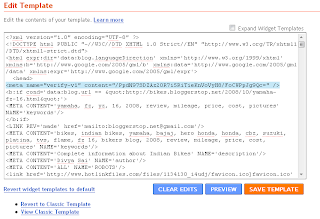
 You've successfully verified http://bikes.bloggerstop.net/.